

Blog
Welcome


Recent posts
SEARCH RESULTS FOR: Featured Wedding Album
With thousands of new templates to choose from in Queensberry's online album designer, here's a great way to simplify your workflow. Tag your favourites so you can filter out the rest. It's so easy, and this little video explains how. Need extra help? You'll find plenty of articles about Workspace and Queensberry products and services on our main website and help centre, but click here for helpful video tutorials and articles about the Album Designer. As we introduce changes we post details on the Queensberry blog, and To View More >>

It so nice knowing that you liked what we made for you — makes all the hard work feel worthwhile. Heidi Horton just shared this lovely video of her new sample album: “Look what's just arrived in the studio!!! My new sample album! A gorgeous 12 x 12 inch Queensberry in Powder Blue Micro Leather; one of my favourites from Queensberry Albums beautiful leather line up. I seriously can't stop looking at it...I am in love with every single spread! Thank you Heidi, there’s a wee thank you on its way to you. Be sure to tag us when you share your Queensberry products on Instagram, To View More >>

In our latest beta we've been doing all the normal things like fixing bugs and tweaking the Queensberry order process but you can read about that in our release notes - I'm excited and I want to jump to our headline! Imagine being able to present your album online and get your clients' feedback and approval from directly within Photojunction. Photojunction has teamed up with albumexposure, the contagiously easy online album proofing tool. We've integrated things so you can register with albumexposure directly in Photojunction and upload your design from PJ to your albumexposure account in just To View More >>

Hello Dears We haven't spoken for an age, but the latest Photojunction release is dear to my heart, so I thought I'd put down my knitting and tell you about it. The PJ boys are very conscious that the Problem Reporter can be frustrating, so they've added a check box which, if you want to, lets you "hide" PJ's warnings (marked with yellow triangles*) so they don't show up again. Now I wouldn't ignore automatically the problem reporter, but it can be a bit bossy sometimes, so this does feel very grown up, don't you think? A bit like the first time you realised people weren't asking you for ID any To View More >>
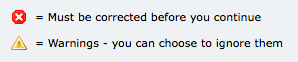
Ideally I like to see the Problem Reporter empty every time I finish a design, but it isn't always, and you're probably the same. By default, any errors you can't ignore are listed first in the Reporter - the ones with the little red and white "X" against them. We can't make your album until they're corrected, so PJ won't let you send your order until they are. The items with the little yellow warning triangle you can ignore if you like. They're sorted into spacing issues, then sizing issues, and lastly alignment issues. Obviously, you want to take care of your red issues first. Complete your album To View More >>
Email: info@queensberry.com
Free Phone Numbers:
New Zealand: 0800 905 905
Australia: 1800 146 251
USA: +18668350851
UK: 0800 808 5271
Canada: +1 855 581 0370